
Every terraform plan runs code, and in most setups that code runs with whatever cloud access the runner holds. Terraplane is the internal platform we built so that at Act, that access belongs to one run and one phase, and expires within the hour. It runs every Terraform change, it's self-hosted on our own Kubernetes, it works with the Terraform CLI our engineers already use, and no person, pipeline or runner holds standing cloud credentials. Here's how it works, and why we made each call.
Why we built it
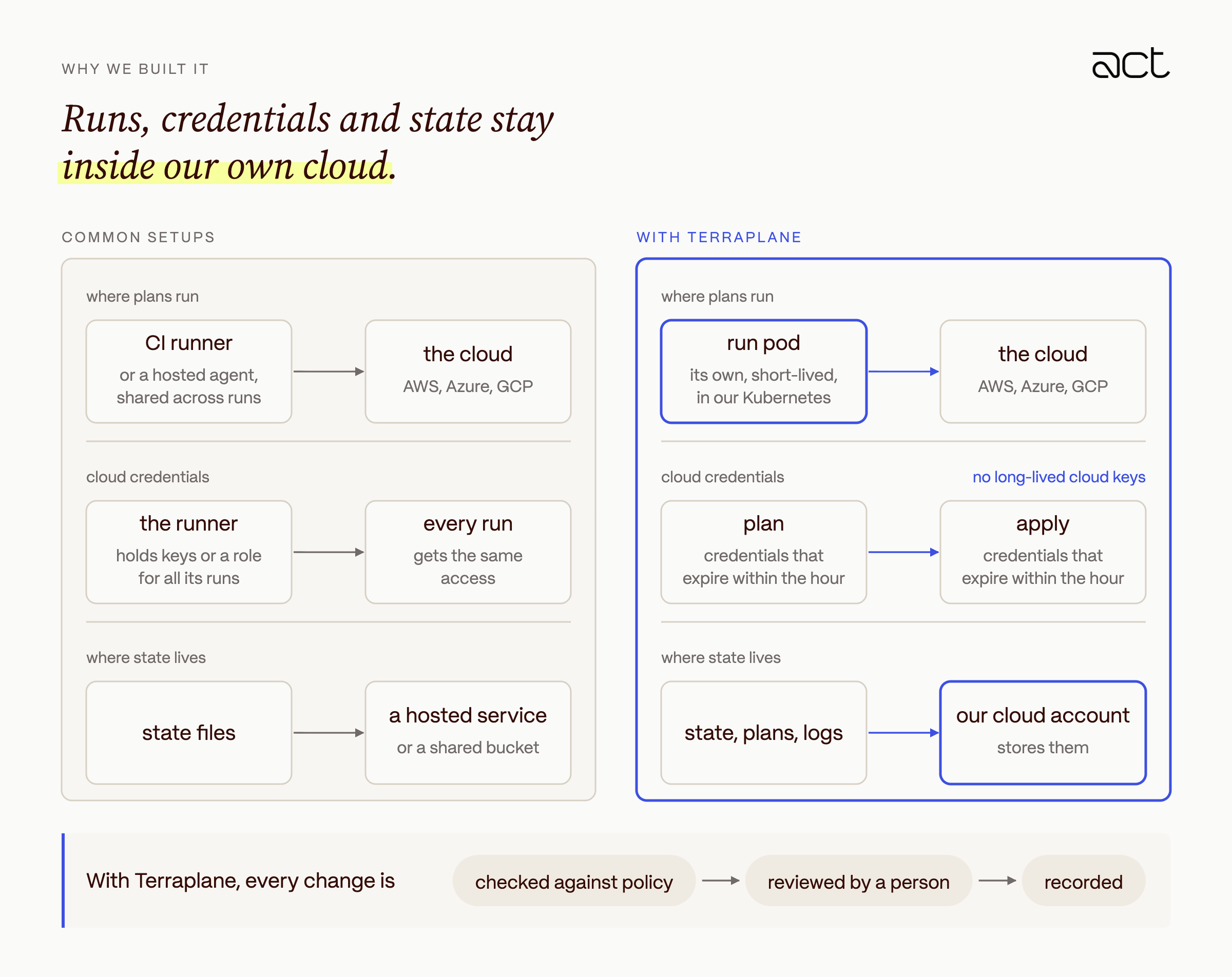
Terraform runs with more access than almost anything else in an engineering org, so where it runs is a security decision. Most teams run it from a GitHub Actions workflow, an Atlantis server that plans on pull requests, or a hosted service. Each of them works, and each comes with a compromise. A CI runner or an Atlantis server usually holds cloud keys or a role that every run on it can use. A hosted service keeps the state files that describe your cloud accounts in someone else's account. As a security company, we wanted runs, credentials and state to stay inside our own cloud.
We set four requirements for the platform:
1. Every plan and apply runs in its own short-lived environment, never on a shared runner and never next to another run.
2. A run gets cloud credentials only for its own phase, and they expire within the hour.
3. State, plans and logs stay in our own cloud account.
4. Every change is reviewed, checked against policy and recorded, including changes started by automation or by Claude.
Terraplane is what we built to meet them. It is an internal tool, not an Act product, and it rests on a few design choices that the rest of this post explains. Every plan and apply runs in its own pod. Each run gets an identity for its current phase only, issued by Terraplane itself. Only the server can touch state. And Claude can plan changes but never apply them.
We also chose not to invent a new workflow. Terraplane implements the remote API that the Terraform CLI already uses, so engineers still run terraform plan against a cloud {} block, and pull requests still get a plan. We kept Terraform's own vocabulary too, such as workspaces, runs, plan-only runs and the three policy enforcement levels, so nobody had to learn new words.
Architecture at a glance
Terraplane has three tiers. The control plane decides what runs and is the only place state is stored. Terraform itself runs in short-lived Kubernetes pods, or on self-hosted workers inside private networks. Our cloud accounts trust Terraplane as an identity provider, so no component along the way holds a cloud key.
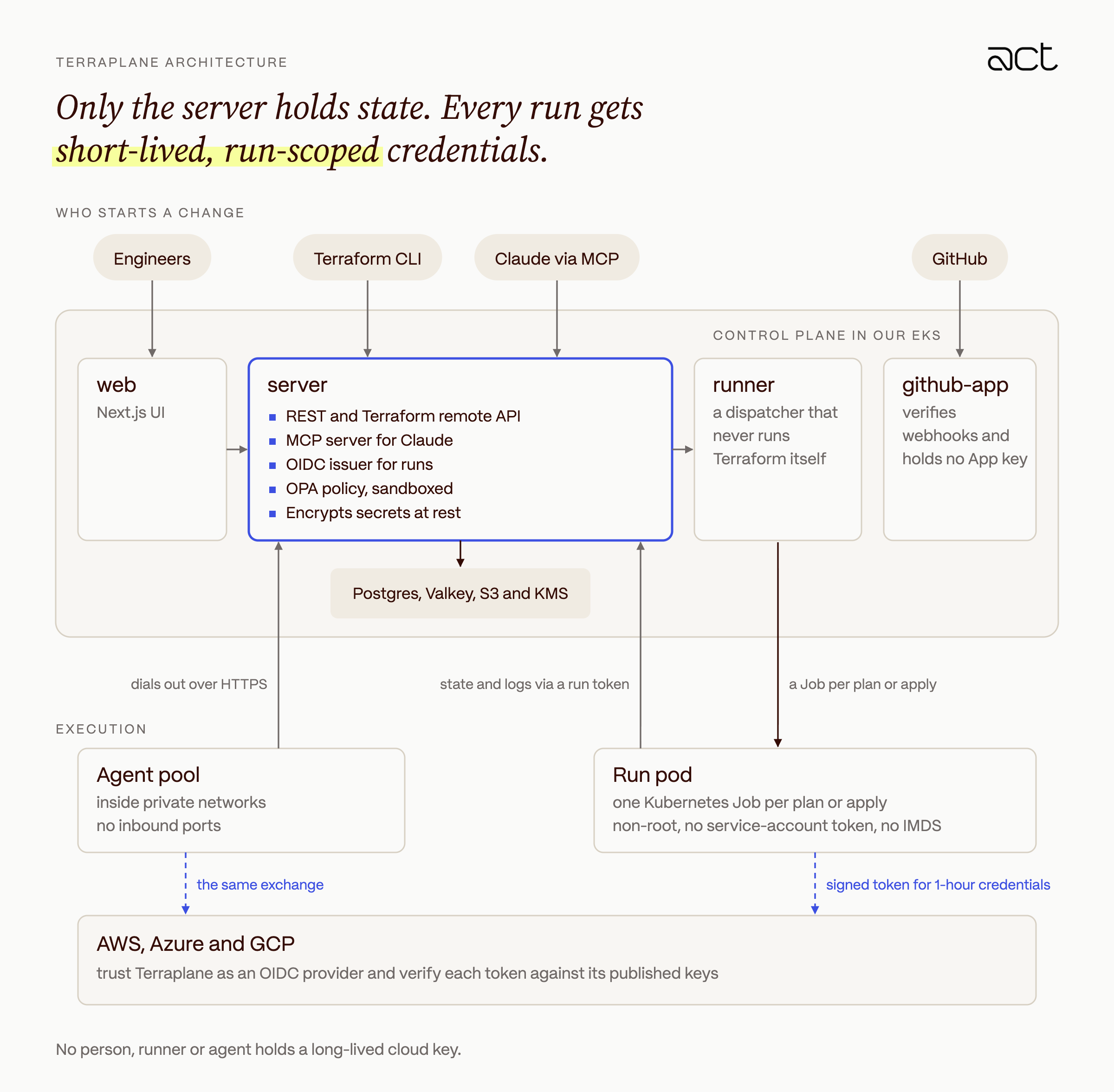
A run never holds storage keys or long-lived cloud keys. Terraform reaches state through the server with a token scoped to its run, and each plan or apply exchanges a Terraplane-signed OIDC token for one-hour cloud credentials.
- server is the only component with access to object storage. It serves the REST API, the Terraform remote API, the MCP server and the OIDC issuer, and it evaluates policy.
- runner consumes the run queue. In production it is a dispatcher that creates one Kubernetes Job per plan or apply, and it never runs Terraform itself.
- Agent pools (self-hosted workers, not AI agents) run Terraform inside networks the control plane cannot reach.
- github-app verifies webhook signatures and asks the server to mint short-lived, read-only installation tokens, so it never holds the GitHub App's private key.
- PostgreSQL, Valkey and S3 hold control-plane data, queues and live logs, and state. Only the server's identity has S3 and KMS permissions.
The life of a run
Before a run changes anything in a cloud account, it has to take the workspace lock, produce a plan, pass the policy check and get a person's approval. Plan-only runs, which include every pull request plan, stop after the plan and its cost estimate.
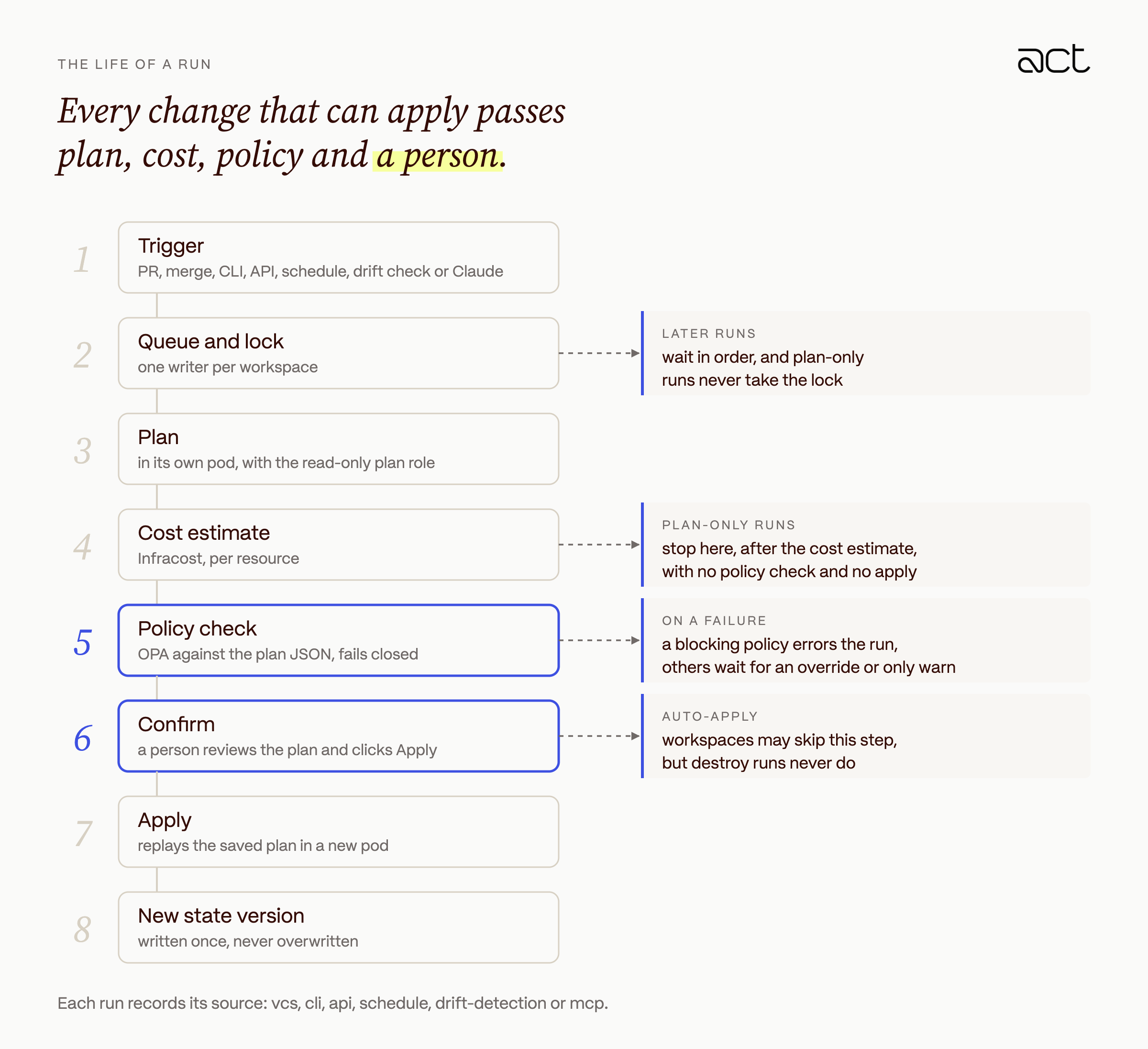
A run can start from a GitHub pull request or merge, the Terraform CLI, the API, a cron schedule, a drift check, or Claude through MCP, and it records which one.
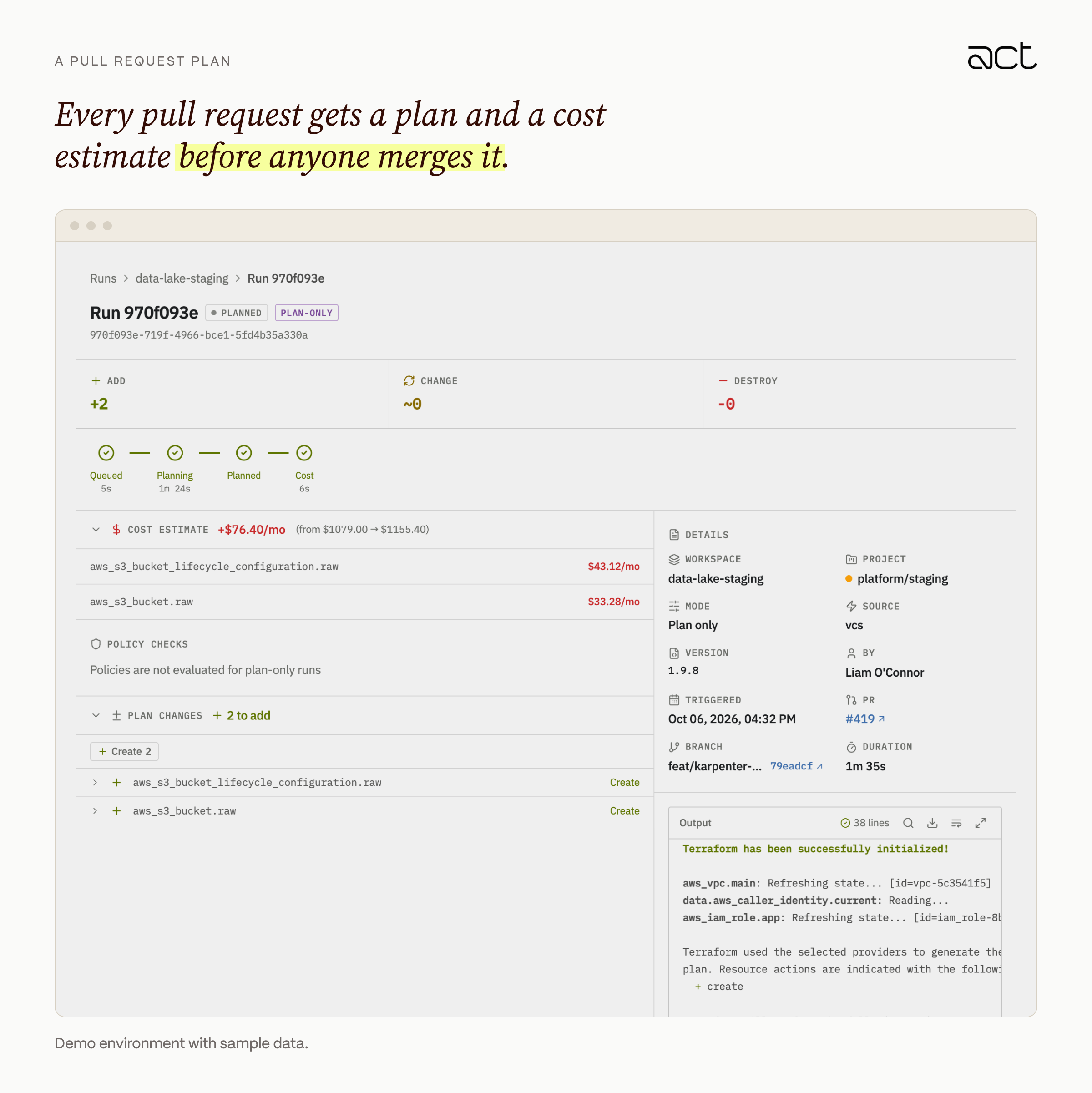
A run that can apply takes the workspace lock with a single conditional update and keeps it until the run finishes, so each workspace has one writer at a time. Later runs wait their turn. Plan-only runs never take the lock.
The plan runs in its own pod. Infracost then estimates the cost change for each resource, and the server evaluates OPA policies against the plan JSON. If the plan JSON is missing, the policy check fails.
After that, a person confirms. The apply replays the saved plan file in a new pod, so the change that was reviewed is the change that runs. Workspaces can opt into auto-apply, but destroy runs always wait for a person.
A run's execution token is minted once, with a compare-and-set on the run's status, so a retried dispatch cannot run the same plan twice. Canceling a run sends Terraform a single interrupt so it can release its own locks.
Runner isolation: a pod per plan or apply
Running terraform plan executes code. Providers, external data sources and modules can all run arbitrary code during a plan, so we treat a pull request that changes Terraform as untrusted until someone has reviewed it, and the isolation model follows from that.
In production the runner does not execute Terraform. It is a dispatcher that creates a new Kubernetes Job for every plan and every apply, and the pod exits when that phase ends. The only thing that carries over between runs is what the server stores.
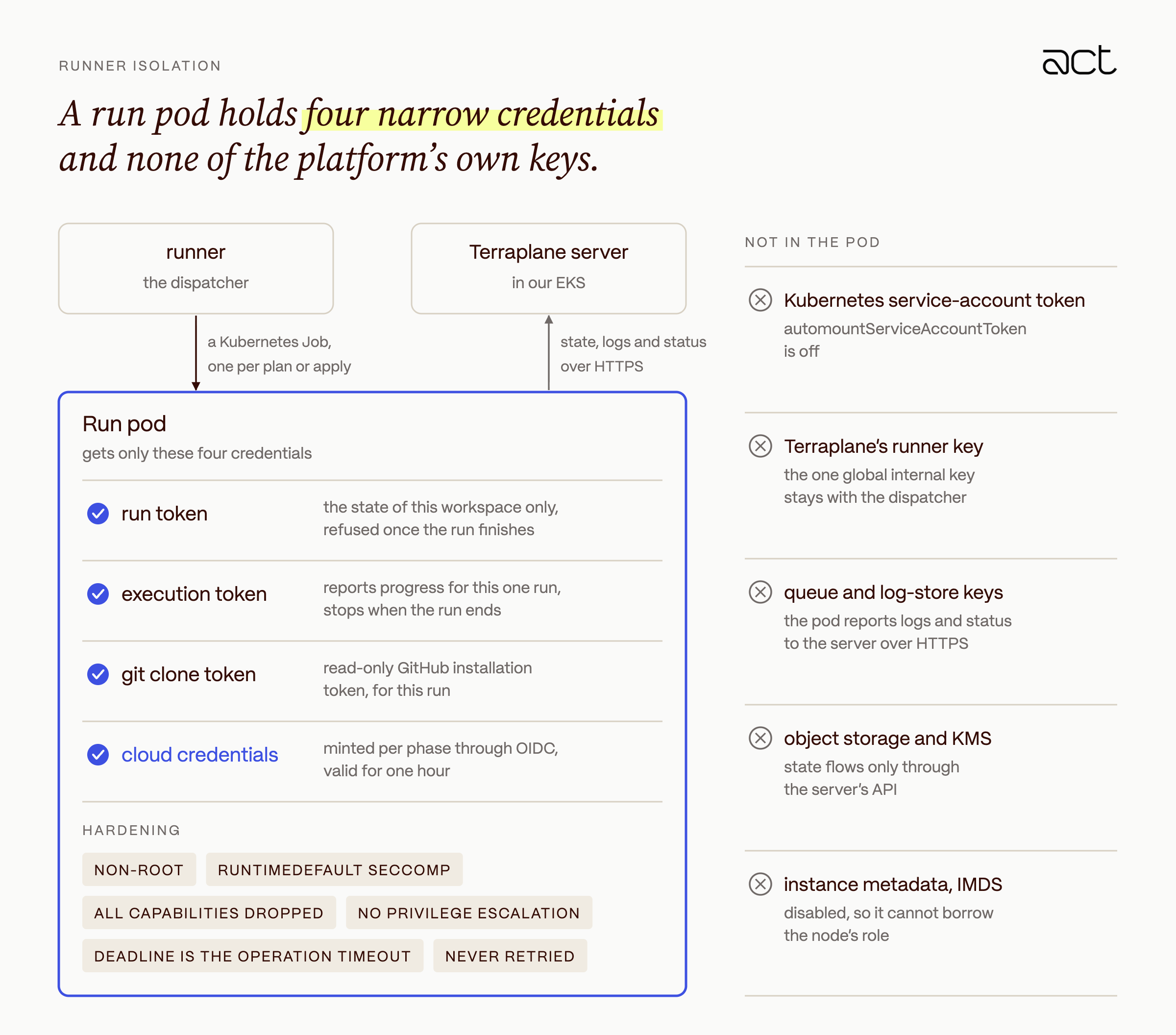
The pod itself runs as a non-root user with the RuntimeDefault seccomp profile, all Linux capabilities dropped and privilege escalation disabled. Its deadline is the workspace's operation timeout, and Jobs are never retried, so a failed apply is never replayed silently.
Terraform inside the pod can read the tokens it was given, and we accept that. Each token is scoped to the run, expires quickly and stops working when the run ends. The pod holds no credential that would let it reach another run.
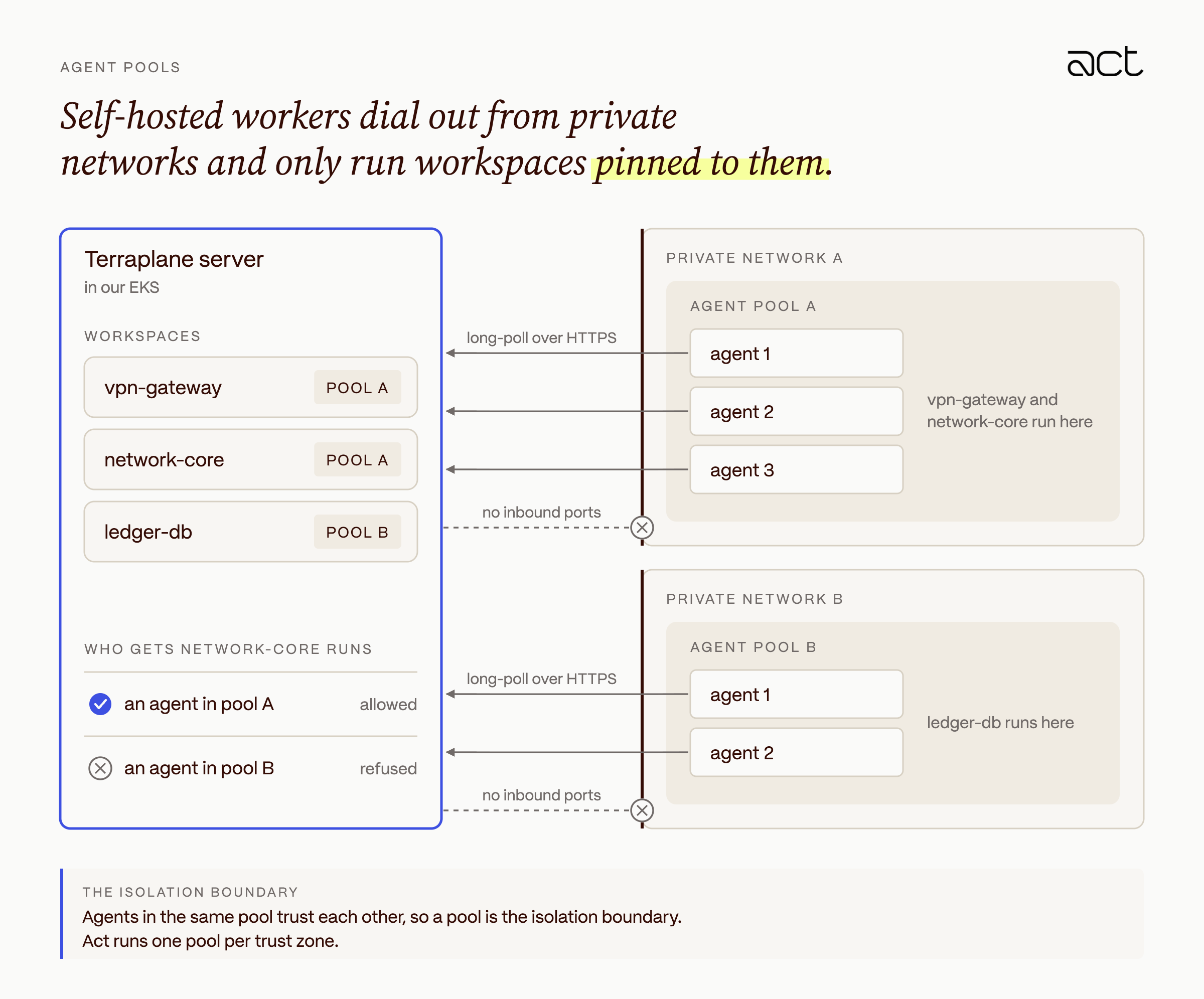
Some workspaces manage systems the control plane cannot reach. For those, we run agent pools inside the private network. Agents open no inbound ports and long-poll the server over HTTPS for jobs. Each workspace is pinned to a pool, and the server will not give an agent a run from a workspace outside its pool. Agents in the same pool trust each other, so we treat a pool as the isolation boundary and run one pool per trust zone.
Plans for pull requests from forks or drafts wait until a maintainer adds the terraplane/approve-plan label, and every new commit removes the label again.
Why Terraplane is its own OIDC provider
No run, runner or worker at Act holds a long-lived cloud key. Terraplane is an OpenID Connect issuer, and our AWS, Azure and GCP accounts trust it directly. Each plan or apply gets a signed token from Terraplane and exchanges it for cloud credentials that expire within the hour.
We looked at the alternatives first. Static access keys in workspace variables are common, and they are the kind of credential that ends up in a log or on a laptop. An IAM role on the runner's node would give every run on that node the same permissions. Terraplane already knows which run, workspace and phase is executing, so having it issue the identity was the only option that scoped credentials to a single change.
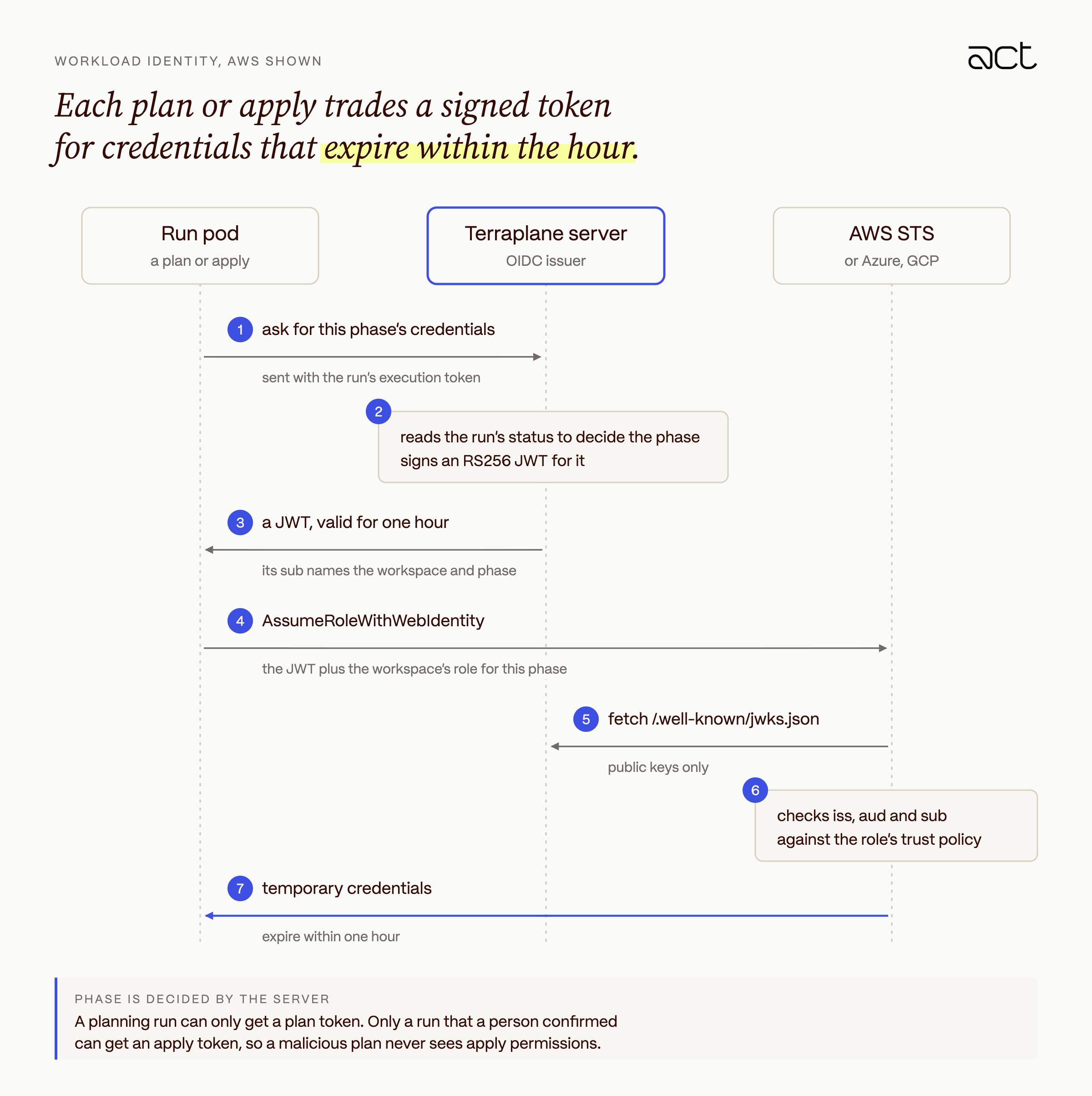
The phase comes from the server, not from the caller. The server reads the run's status, so a run that is planning can only get a plan token, and only a run that a person has confirmed can get an apply token. Each workspace can then use a read-only role for plans and a separate role with write access for applies, and a malicious plan never gets apply permissions.
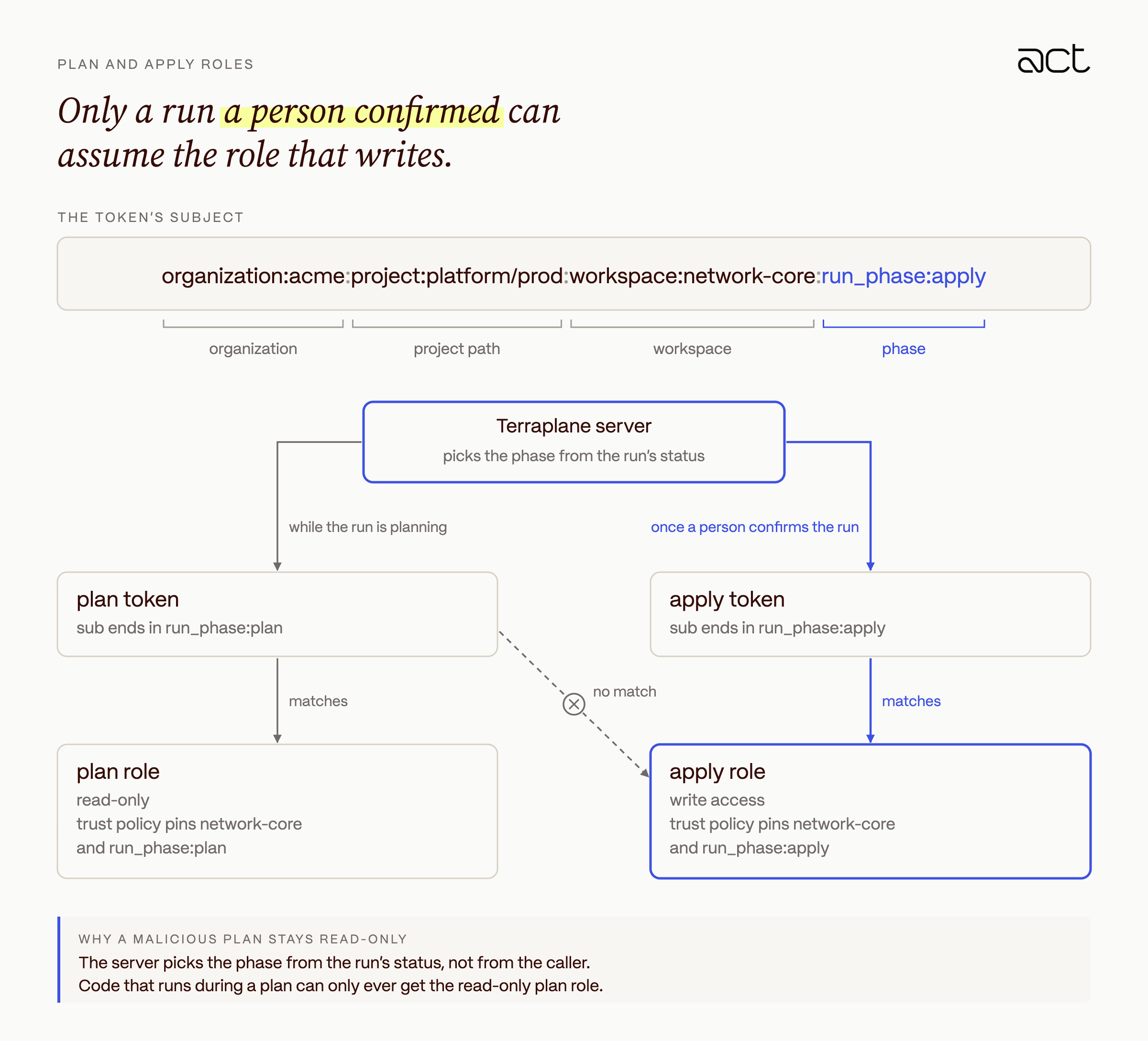
The token's subject names the organization, project path, workspace and phase, so a trust policy can pin a role to one workspace and one phase. Here is a shortened example.
{
  "iss": "https://terraplane.example.com",
  "aud": "aws.workload.identity",
  "sub": "organization:acme:project:platform/prod:workspace:network-core:run_phase:apply",
  "terraplane_run_id": "run-7f3a",
  "exp": "issued at + 1 hour"
}
A role's trust policy then pins the exact workspace and phase it serves.
"Condition": {
  "StringEquals": {
    "terraplane.example.com:aud": "aws.workload.identity",
    "terraplane.example.com:sub": "organization:acme:project:platform/prod:workspace:network-core:run_phase:apply"
  }
}
The RS256 signing key is generated on first boot and stored envelope-encrypted in the database. Only the public key is published, at /.well-known/openid-configuration and /.well-known/jwks.json, where the cloud providers fetch it to verify signatures.
The same token works for all three clouds. AWS exchanges it through AssumeRoleWithWebIdentity, Azure through federated credentials, and GCP through workload identity federation, optionally impersonating a service account.
State custody and secrets
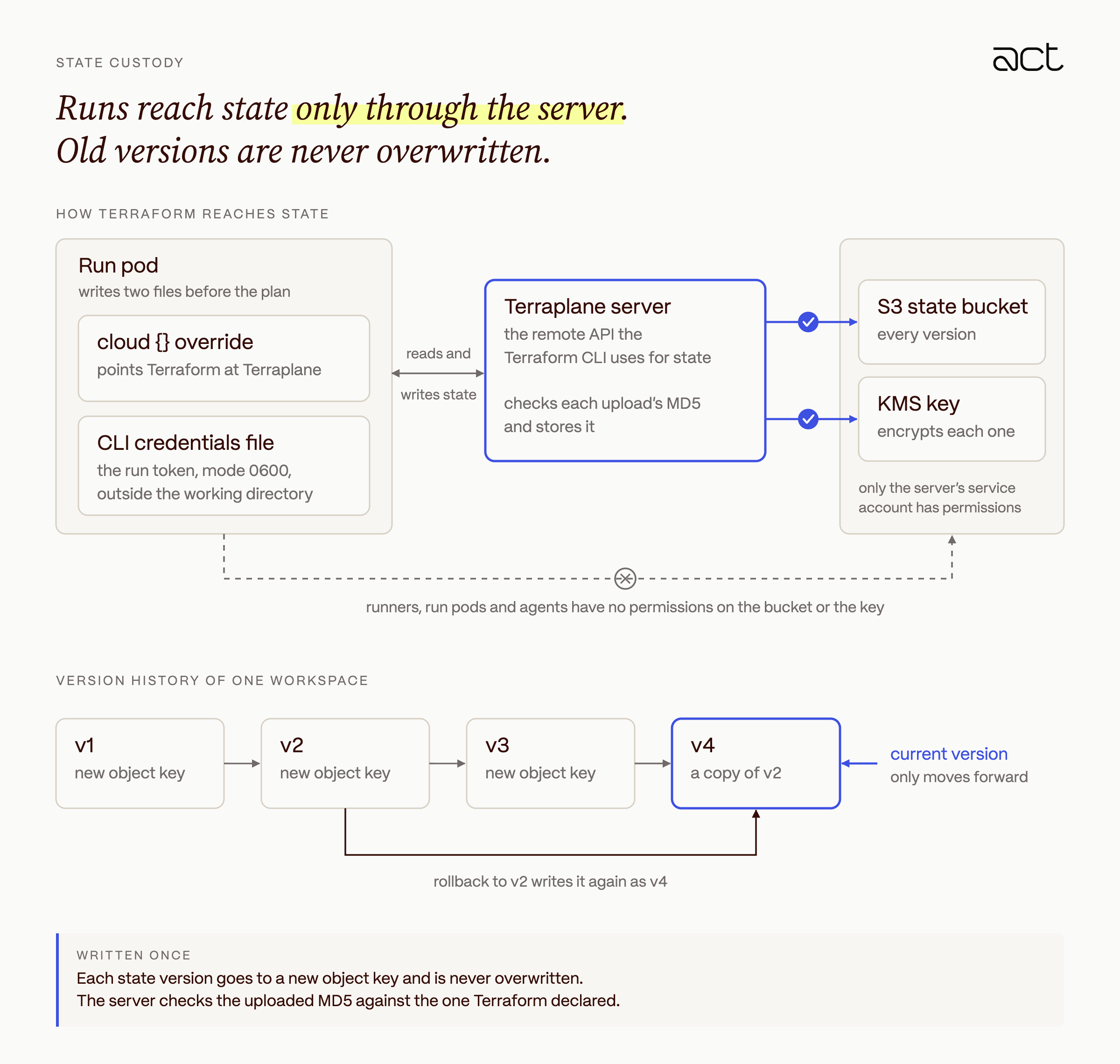
Terraform state describes everything we run and often contains secrets, so only the Terraplane server can read or write it. Its Kubernetes service account is the only identity with permissions on the state bucket and its KMS key. Runners, run pods and workers have none.
Before a plan, the run pod writes a cloud {} override that points Terraform at Terraplane, plus a CLI credentials file holding the run token. The file is mode 0600 and lives outside the working directory. Terraform then reads and writes state through Terraplane's implementation of the Terraform remote API, and the server stores each version.
We also protect the history of each workspace's state.
- Every state version is written once, to a new object key, and never overwritten.
- The server checks the uploaded MD5 against the one Terraform declared.
- A workspace's current-version pointer only moves forward. Rolling back means writing an older version as a new one, so history is never lost.
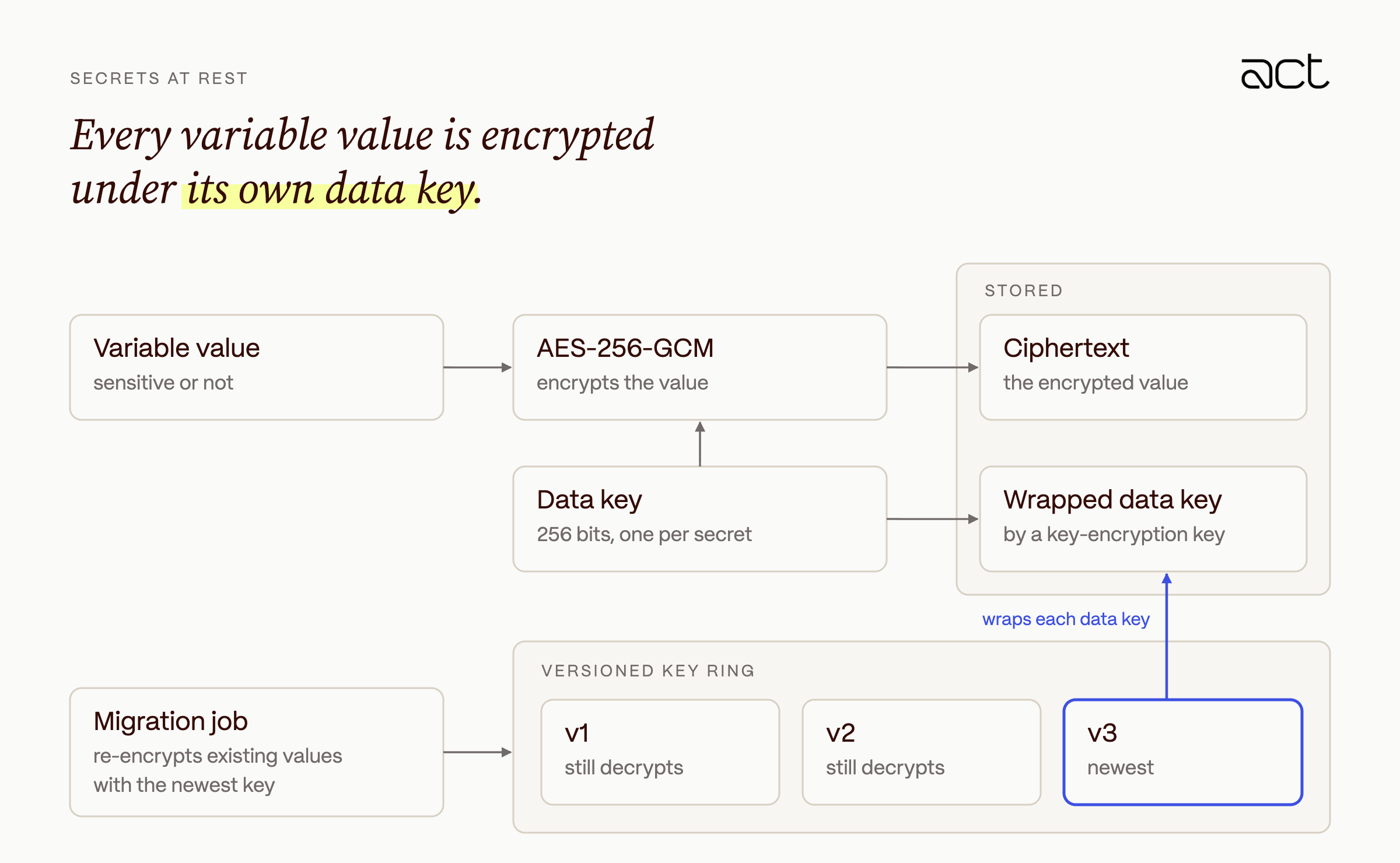
Every variable value is encrypted at rest, not only the ones marked sensitive. Each secret gets its own 256-bit data key and is encrypted with AES-256-GCM. The data key is then wrapped by a key-encryption key from a versioned key ring. New values use the newest key, older keys can still decrypt, and a migration job re-encrypts existing values with the newest key.
We also limit where secret values can show up.
- Sensitive variables are never returned by the API or the UI, and a sensitive variable cannot be made non-sensitive.
- API, team, SCIM and agent pool tokens are stored only as SHA-256 hashes.
- Sensitive values in plans are replaced with
(sensitive)on the runner, before the plan reaches the UI. - The state browser shows an allowlist of identifying attributes (
id,arn,name), not raw attribute values. TF_LOGandTF_CLI_ARGSare refused for runs, so provider debug traces with request bodies never reach run logs.
Policy as code, and drift
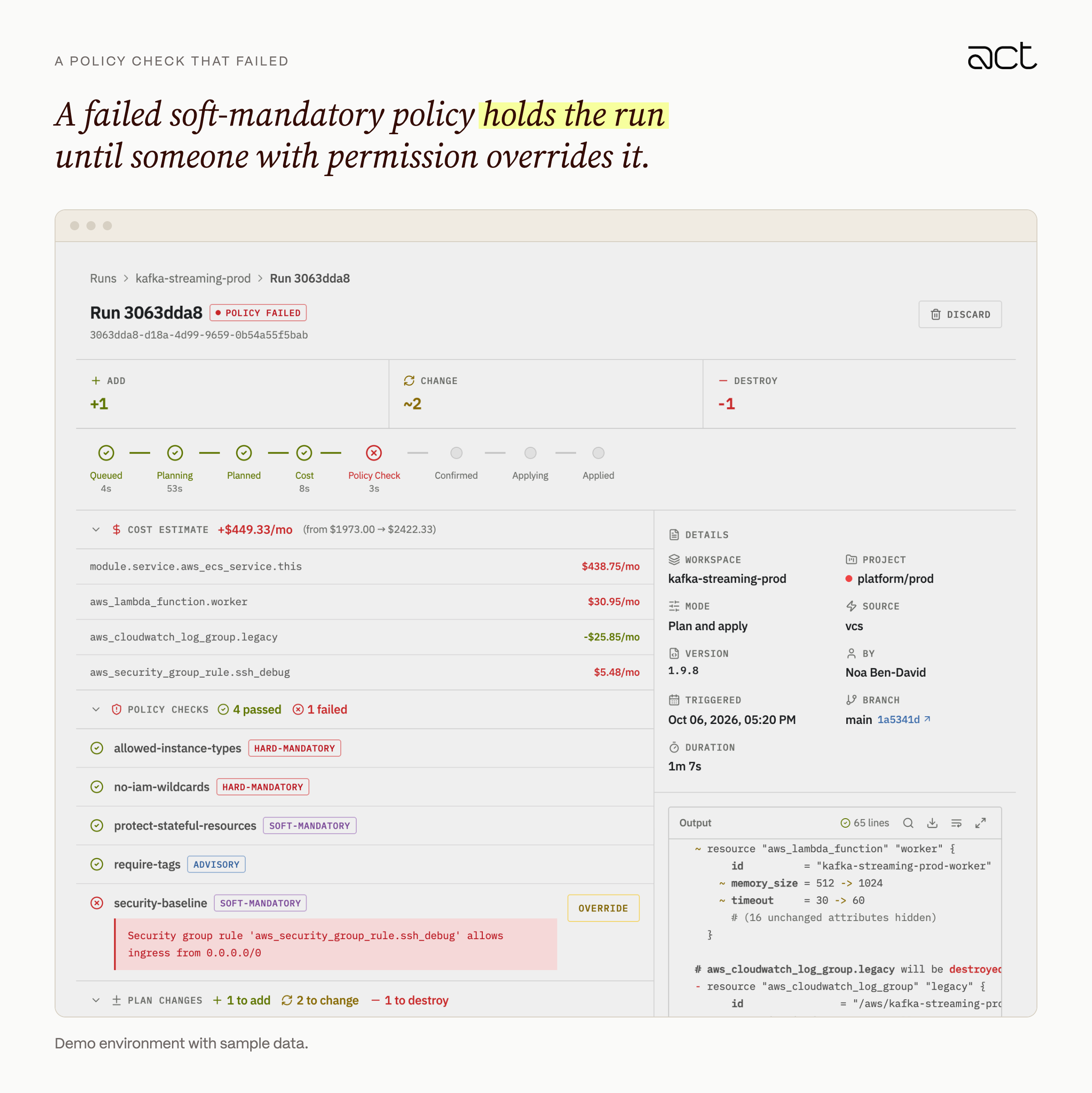
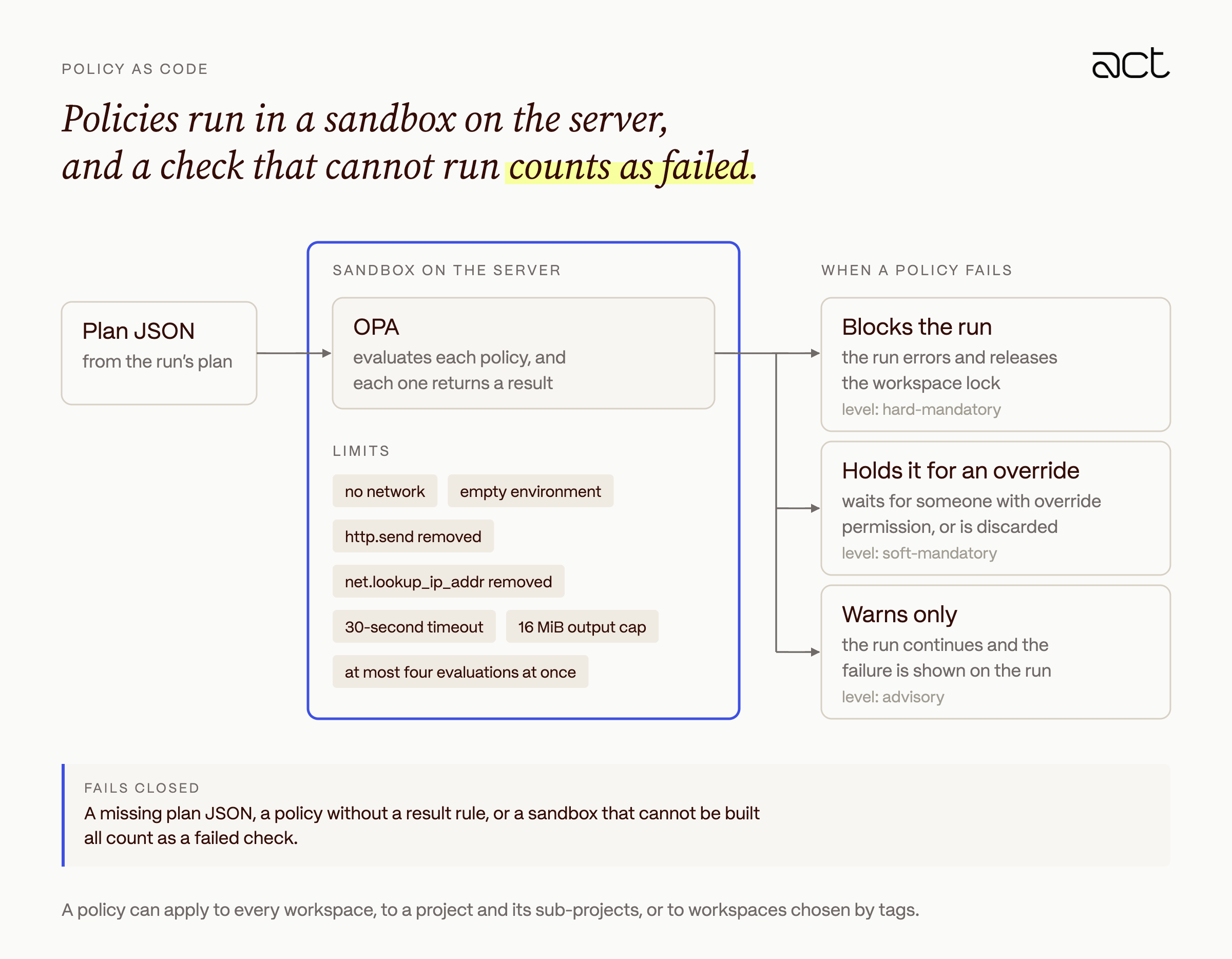
Every run that can apply is checked against Open Policy Agent policies before a person sees the Apply button. Policies are Rego files evaluated against Terraform's plan JSON, and each one has an enforcement level that decides what a failure does to the run. It can block the run, hold it until someone overrides it, or only warn.
A policy can apply to every workspace, to a project and its sub-projects, or to workspaces selected by tags. Here is a run held by a failed security-baseline policy, and below it a short policy that catches the same problem.
package terraplane.security_baseline

import rego.v1

violations contains msg if {
	some rc in input.plan.resource_changes
	rc.type == "aws_security_group_rule"
	rc.change.after.type == "ingress"
	"0.0.0.0/0" in rc.change.after.cidr_blocks
	msg := sprintf("%s allows ingress from 0.0.0.0/0", [rc.address])
}

result := {"violations": violations, "passed": count(violations) == 0}
Policies run on the server, so the evaluator runs in a sandbox with no network access, an empty environment, and limits on time, output size and concurrency. A check that cannot run counts as a failure.
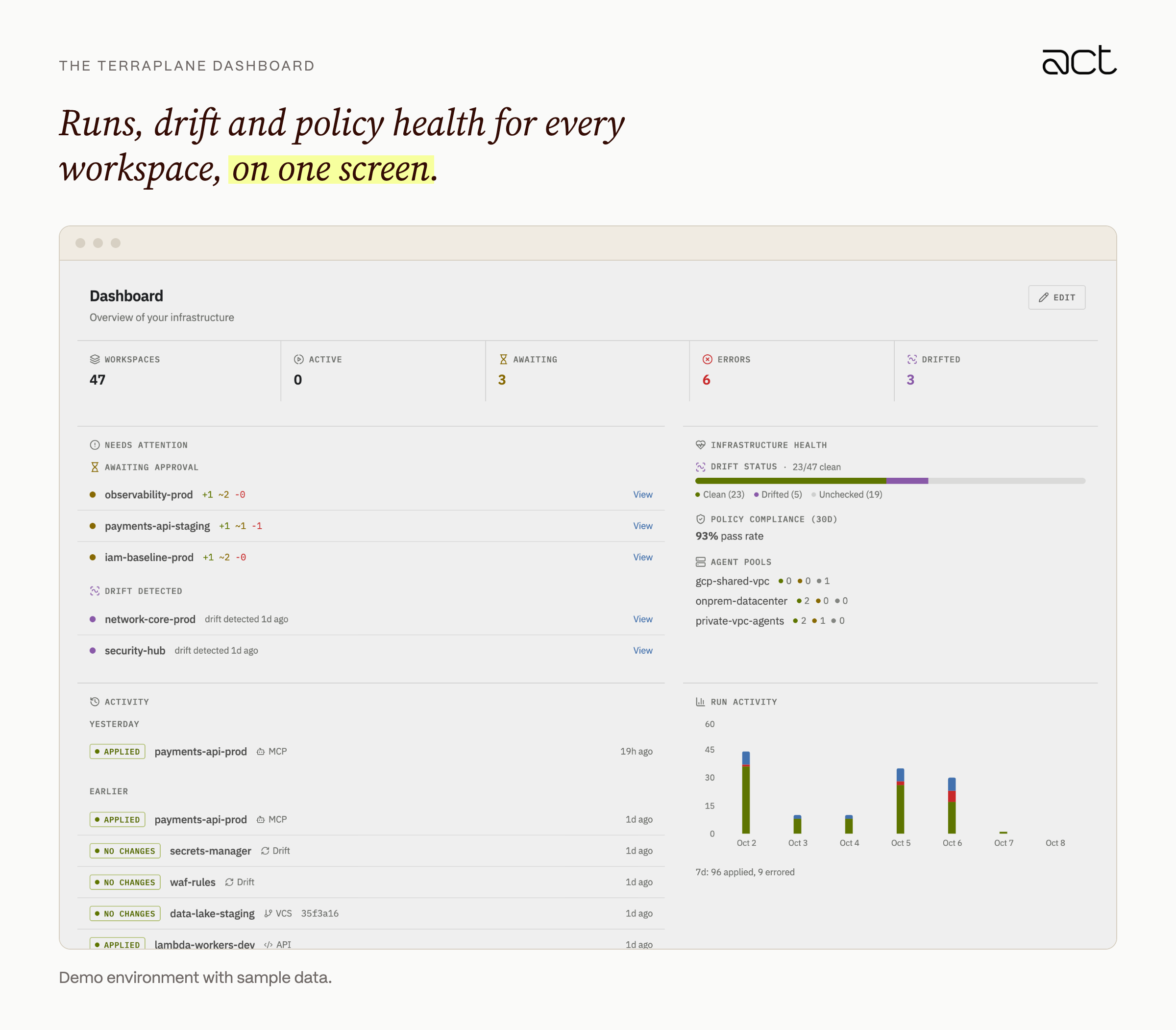
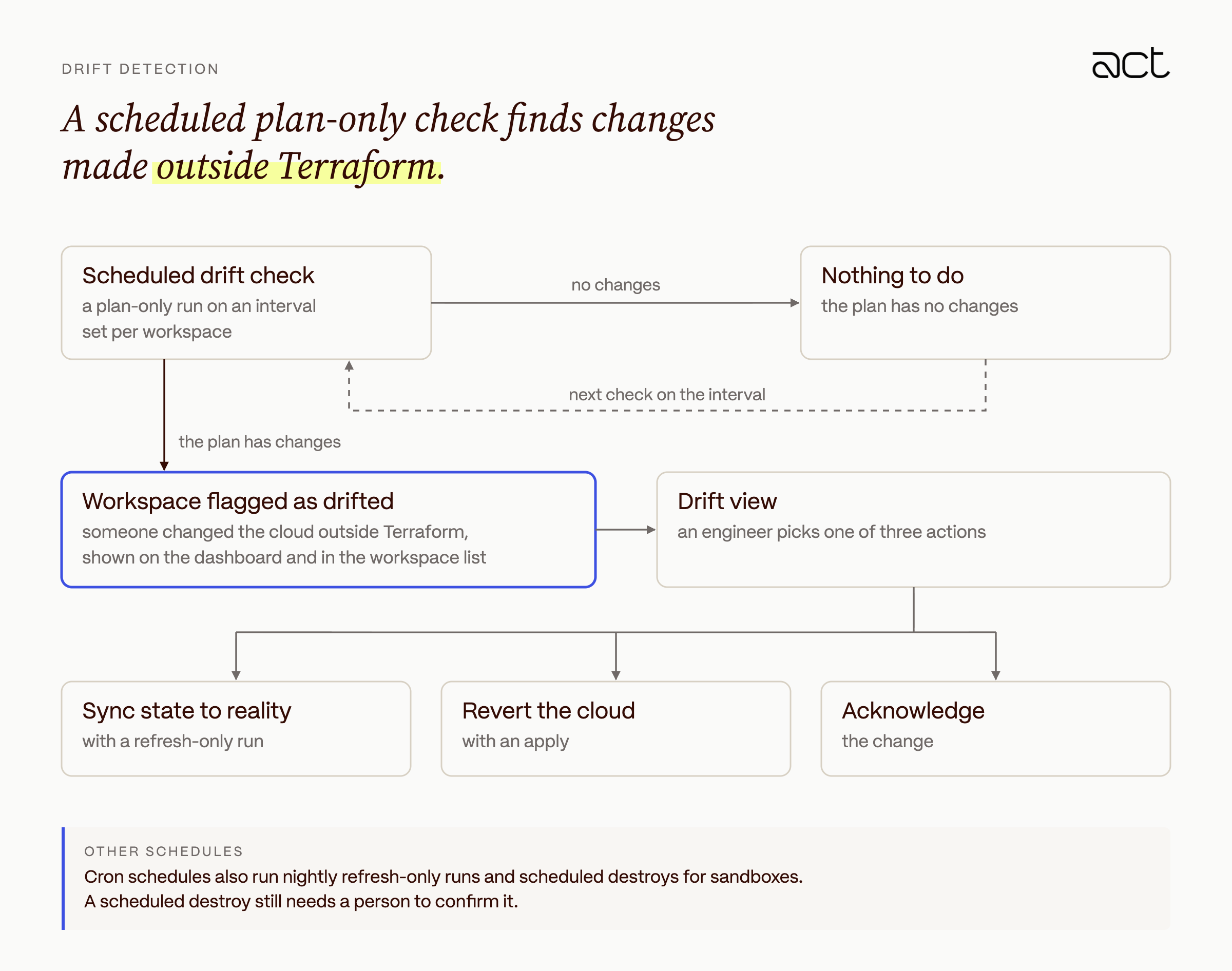
Workspaces can also run a scheduled plan-only drift check, on an interval set per workspace. A plan with changes means someone changed the cloud outside Terraform, and the workspace is flagged as drifted on the dashboard and in the workspace list. From the drift view, an engineer can sync state to reality with a refresh-only run, revert the cloud with an apply, or acknowledge the change. We also use cron schedules for nightly refresh-only runs and for destroying sandboxes, and a scheduled destroy still needs a person to confirm it.
Access and audit
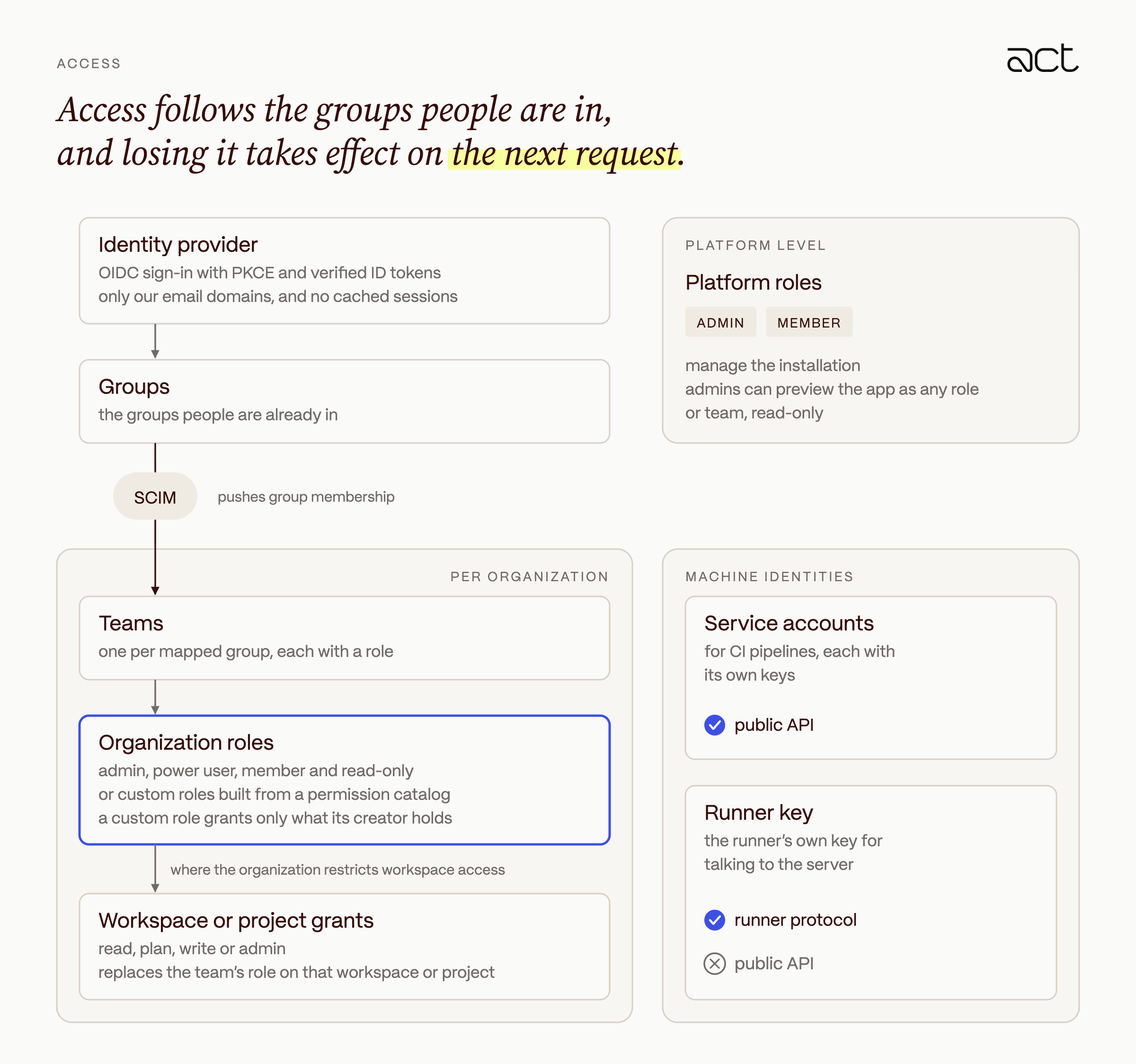
People sign in through our identity provider, and their permissions come from the groups they are already in.
- Sign-in uses OIDC with PKCE and verified ID tokens, limited to our email domains. Sessions are not cached, so when someone loses access it takes effect on their next request.
- SCIM pushes group membership from the identity provider, and each mapped group becomes a team with a role.
- Roles live on two levels. A small platform level (admin or member) manages the installation. Everything else is set per organization, with system roles (admin, power user, member, read-only) and custom roles built from a permission catalog. A custom role can only grant permissions its creator holds.
- When an organization restricts workspace access, a team's grant on a workspace or project (read, plan, write or admin) replaces its role there.
- Platform admins can preview the app as any role or team, read-only, to check what that role can see.
- CI pipelines use service accounts with their own keys. The runner's key is accepted only on the runner protocol, never on the public API.
Every change is recorded in a single audit log.
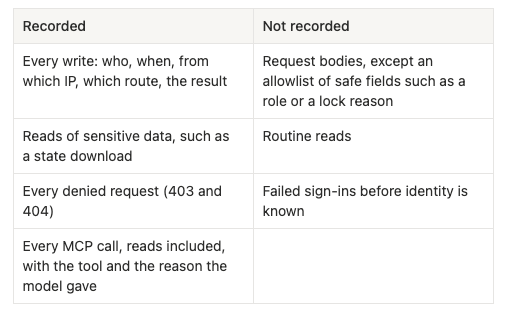
Audit entries are kept for 365 days by default.
Claude through MCP, with people on the Apply button
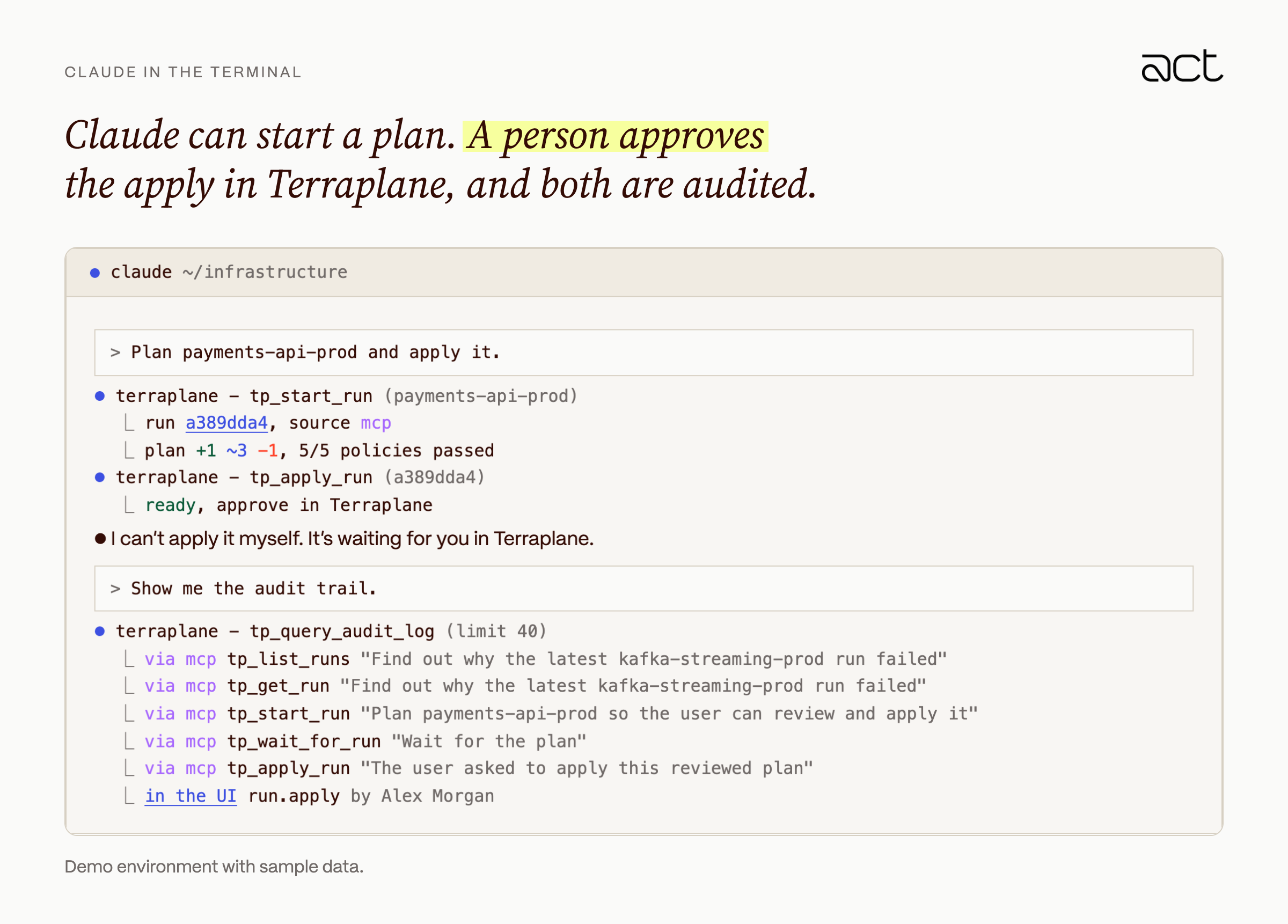
Terraplane is also an MCP server, so engineers can ask Claude why a run failed, what a plan changes or which workspace owns a resource, from the same terminal they write Terraform in. We built it around one rule. Claude acts as the engineer, with the engineer's permissions, and never applies anything. We don't rely on the model to make that call. The boundary lives in the API, where the apply routes refuse MCP calls.
- Claude connects with OAuth 2.1 and PKCE. The first tool call opens a browser, where the engineer signs in to Terraplane and approves a consent screen listing what Claude will be able to do. We accept clients only from allowlisted client metadata documents, and dynamic registration is off.
- Access tokens last 10 minutes and are bound to the MCP endpoint, and refresh tokens last 8 hours. An MCP token does not work on the REST or Terraform APIs.
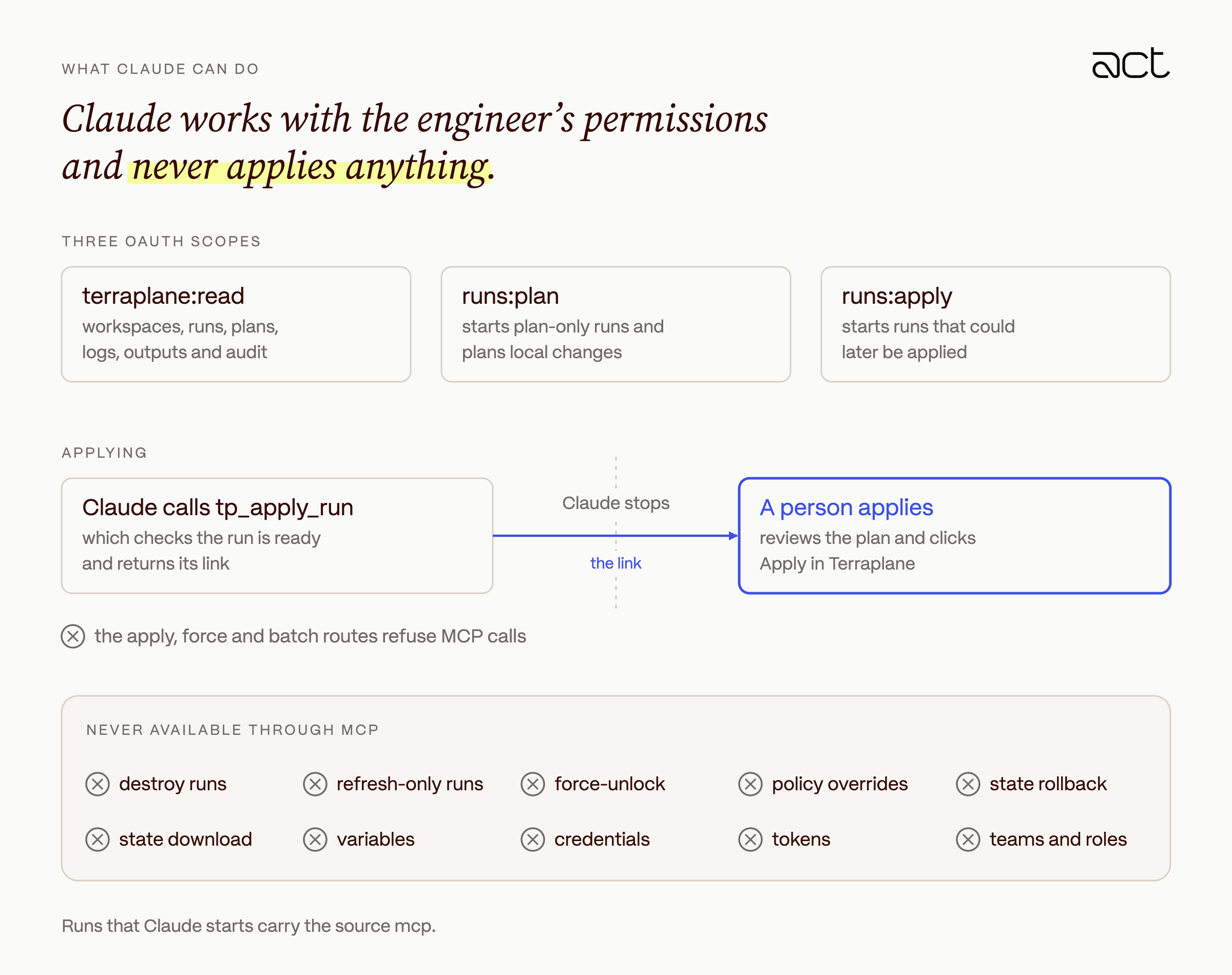
- Three scopes control what Claude can do.
terraplane:readcovers workspaces, runs, plans, logs, outputs and audit.runs:planstarts plan-only runs and plans local changes.runs:applystarts runs that could later be applied. - Each tool calls the REST API in-process as the user, so it goes through the same authentication, RBAC and rate limits as the user's own requests.
- The apply, force and batch routes refuse MCP calls.
tp_apply_runonly checks that a run is ready and returns its link, and a person reviews it and clicks Apply in Terraplane. - Some actions are not available through MCP at all: destroy and refresh-only runs, force-unlock, policy overrides, state rollback or download, variables, credentials, tokens, teams and roles.
- Text that other people wrote, such as plan output, logs, commit messages and resource names, comes back in
untrusted_contentfields, and the server instructions tell the model to treat it as data. Credential-shaped strings are removed from tool output. - Every call, including reads, is in the audit log with
via = mcp, the client, the tool and the reason the model gave for the call. Runs that Claude starts have the sourcemcp.
In a typical session, an engineer asks why a production run failed, and Claude reads the run and names the policy that blocked it. The engineer asks for a fix and a new plan, and the apply then waits in Terraplane for a person, like any other change.
Building it versus buying it
Building our own platform was not the obvious choice. Before Terraplane we used a hosted service, and a service like that handles upgrades, uptime and support without anyone on your team running it. For many companies that is the better deal. We built Terraplane for control over isolation, identity and custody, and only measured cost and speed once the move was done. Running it costs about 90 percent less than our hosted subscription did, because we pay for a few small nodes and a database rather than a price per managed resource. Plans also finish about three times faster at the median, on the same workspaces.
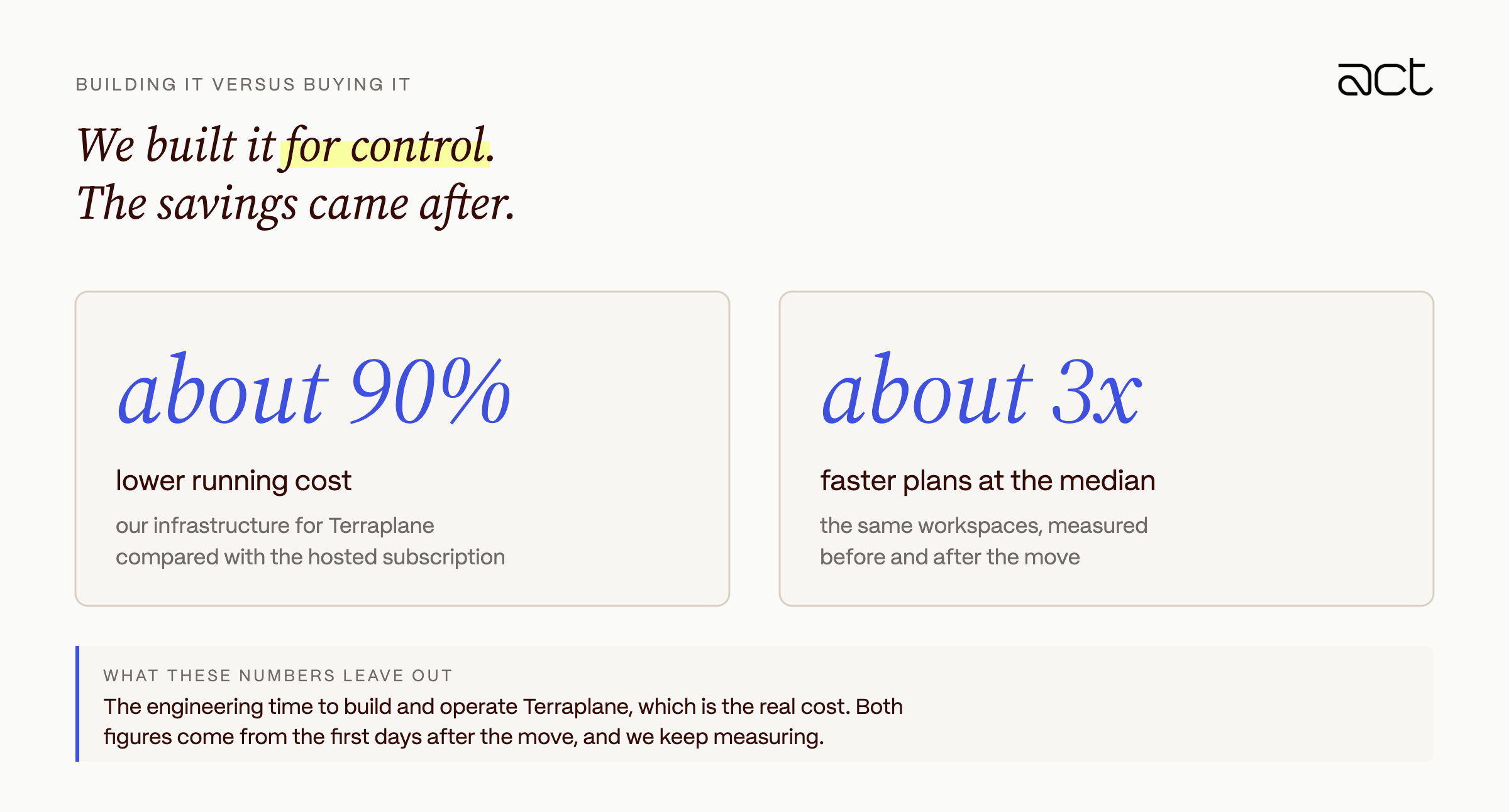
Those numbers leave out the engineering time it took to build Terraplane and the time it takes to run it, and that is the real cost. They also come from the first days after the move, so we will keep measuring.
What we learned
Self-hosting gave us control over where our state and credentials live. It also made us responsible for a production service that every infrastructure change depends on.
- Because Terraplane implements the API the Terraform CLI already uses, moving more than a hundred workspaces meant copying state and settings. We did not have to rewrite Terraform code or change how engineers work.
- The server signs the tokens our cloud accounts trust, so anyone who controlled it could reach those accounts. We give it the same access controls, alerting and change process as our most sensitive systems.
- Our first availability problems came from replicas scheduled onto the same short-lived nodes. Spreading them out was a small change, and we should have made it from the start.
- A missing plan JSON, a policy that does not parse and a token requested in the wrong phase all stop the run. We would rather lose a few minutes to a blocked run than clean up after a bad apply.
- We stopped trying to hide every token from Terraform. Instead, each token a run can see works only for that run and its phase, and only until the run ends.
Next, we're hardening the signing and dispatch path further.
Terraplane comes down to one rule we apply everywhere at Act. Nothing should be able to reach more than its job needs.
Learn more at act.security.