
How to turn Threat Models for AWS services into policies you can enforce
Threat models for AWS services give security teams a shared blueprint for what a secure deployment of an AWS service looks like, with each threat tied to a mitigation and the controls that enforce it. This post covers what’s inside the models, the risks they cover, and how to enforce them easily with Act.
A developer asks to use Amazon DynamoDB. Before anyone says yes, someone on the security team has to decide what a secure DynamoDB setup looks like. There's no single source of truth for that. The service docs, your compliance framework, and whatever the last reviewer left in a ticket each cover part of it, and they don't always agree. That person works out how a table could be read from outside the company and hand-writes the service control policies (SCPs) and resource-based policies to stop it. Next week another team wants to use Amazon SNS, and they start over.
In October 2026, Amazon Web Services (AWS) published Threat models for AWS services, starting with Lambda, DynamoDB, EFS, SNS, and Aurora DSQL, and it's already adding models for more services. The models are built to help security teams speed up service reviews and roll out security and governance controls. Each one covers the misconfiguration risks on the customer's side of the AWS Shared Responsibility Model, and the scope covers security and governance objectives, including data protection, resilience, availability, operational governance, and privacy. In this post, we walk through what's in the models and how we use them in Act.
Inside the models
All the models follow the same structure, so one Lambda threat is enough to show how the pieces fit together.
Each model starts from threats. Take an outside account that can invoke your Lambda function because the function policy lets it.
The mitigation is the configuration that closes it, here one that keeps untrusted identities from invoking the function, along with the request parameters that set it and the ones you check to confirm it.
The implementations are the controls that enforce it. For this one, the model lists an SCP that limits who can call lambda:AddPermission, a CloudFormation Hook that stops a bad policy at deploy time, and a Config rule that finds one already in place.
Every threat is also tagged with impacts, such as data exfiltration, and each impact maps to a MITRE ATT&CK tactic.
The SCP and resource control policy (RCP) entries are skeletons. They name the actions, resources, and condition keys to use, and you supply the Effect and values that fit your organization and control boundaries.
The models only cover how each AWS service is configured, and your application code and workload-specific threats are out of scope.
The ATT&CK tags help with compliance too. MITRE publishes mappings from ATT&CK to NIST SP 800-53, so you can show an auditor which controls a mitigation supports.
The risks they cover
These are some of the impacts that come up across the models.
- Data exfiltration and collection, like an outside account reading your DynamoDB stream through its resource-based policy, or a role in your VPC copying data to a DynamoDB table in an account outside your organization.
- Defense evasion, like valid credentials used against your DynamoDB table from a network you don't expect.
- Initial access, like anyone who finds a public SNS topic using it.
- Data destruction, like someone with delete permissions removing an Aurora DSQL cluster and every table in it.
The fixes are a mix of SCPs, RCPs, and resource-based policies. Some draw a data perimeter with condition keys like aws:PrincipalOrgID and aws:ResourceOrgID, and others set posture, like requiring encryption in transit or limiting who can delete a table.
Where Act fits
AWS wrote the models for every customer, so they can't tell you which mitigations fit your environment, which resources already fall short of them, or which workload breaks the day you enforce a new SCP or RCP. AWS says as much in the repository, where it recommends tailoring each model to your environment and testing each control so it doesn't disrupt legitimate workloads before rolling it out progressively. Doing that takes a clear picture of how each service is configured and used across your organization, including which vendors assume roles in your accounts and which pipelines from other organizations call your APIs. Most teams don't have that written down. It changes every time someone adopts a service or adds a tool, and the evidence sits in resource configurations, policies, and CloudTrail logs spread across every account. We added the first five models to Act so every mitigation gets checked against that evidence. Act shows which exceptions make a control safe to enforce today and which resources need fixing first, whether you're approving a new service or tightening posture on the ones you already run.
Start from what you run
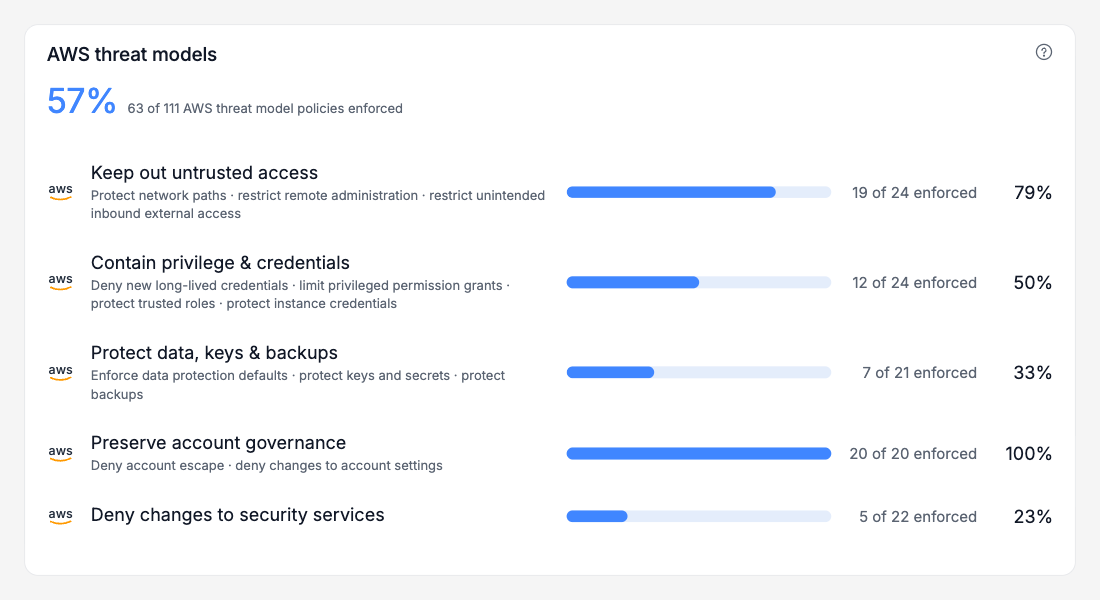
To mitigate the threats in a service's model with Act, start by picking the service. Act scans your AWS organization and maps configured access (what your policies allow) and observed access (what CloudTrail shows is used). From that, it builds a prioritized list of the mitigations to apply for the service, each scoped to the OUs and accounts where it takes effect. For each mitigation, Act shows the resources that don't meet it, wherever the scanner can see the setting, along with the policy that enforces it. For the mitigation that requires encryption in transit on SNS topics, Act lists the topics whose policies don't deny unencrypted requests, gives you the SCP that rejects unencrypted requests from your own principals, and helps you update those topic policies. You can work through mitigations one service at a time, or by impact to take on data exfiltration across every service at once.
Test every deny before it lands
Each mitigation's implementation becomes a policy in Act. Act first simulates the policy against your access map, and if it would block something you still need, like a vendor or a deployment pipeline, Act calculates the exception from what it sees in your accounts and writes it into the policy. It shows you the carve-out both ways, by principal ARN or by a dp:exclude tag, and you pick the one that matches how you run things.
Next, Act tests the policy against observed access, meaning what CloudTrail shows was used over the last 90 days, or as far back as your CloudTrail history goes. It then runs the policy in audit mode and lists every new request it would have denied going forward. CloudTrail only captures what it's configured to log. For data plane calls, like reads and writes on DynamoDB items, Act turns on data events only for the audit period and only within the policy's scope, which keeps the extra logging cost low. Once the audit comes back clean and the policy includes all the exceptions that ensure nothing breaks, you get it as Terraform or JSON with a prompt for your coding agent, and you deploy it through your own CI/CD pipeline without surprises.
Check that it still holds
After you deploy, Act keeps checking each mitigation against the verification parameters in the model, wherever the scanner can see the setting. If someone detaches a policy or edits it outside your pipeline, Act flags the drift.
Example: who can delete your production tables
Threat.DYNAMODB.Table.1 is the simplest threat in the DynamoDB model. Anyone with permission to delete a table can delete it, along with every item in it. The mitigation is deletion protection, and the model backs it with an SCP on dynamodb:DeleteTable and dynamodb:DeleteTableReplica that lets only the principals you name delete tables, even when deletion protection is off.
The model gives you those two actions and the condition key aws:PrincipalArn, or aws:PrincipalTag/${TagKey} if you manage roles by tag. Who belongs on that list depends on your environment.
In production accounts, the roles that can delete a table usually add up fast. Say Act finds dozens, including the admin and PowerUser permission sets your engineers sign in with, the coding agents that run under those sessions, a few old CI users, and the pipeline that deploys your CloudFormation stacks. CloudTrail shows that only two of them called DeleteTable in the last 90 days. One was the CloudFormation service role, when a schema change made a stack replace a table. The other was an engineer's admin session, cleaning up a table by hand.
Act writes the exception for the CloudFormation service role, because that's the identity CloudTrail recorded on the delete, even though the pipeline role started the deploy. You choose whether the exception is the role's ARN or a tag on it. You add your break-glass role yourself, since nobody has needed it yet and it won't show up in the logs. The engineer's manual delete gets no exception, so you let them know before the policy lands. The following is the SCP for your production organizational unit (OU), with both exceptions written as role ARNs.
{
  "Version": "2012-10-17",
  "Statement": [{
    "Sid": "RestrictTableDeletion",
    "Effect": "Deny",
    "Action": ["dynamodb:DeleteTable", "dynamodb:DeleteTableReplica"],
    "Resource": "arn:aws:dynamodb:*:*:table/*",
    "Condition": {
      "ArnNotLike": {
        "aws:PrincipalArn": ["arn:aws:iam::*:role/cfn-deploy", "arn:aws:iam::*:role/break-glass"]
      }
    }
  }]
}
The statement denies table and replica deletion to every principal in the OU except those two roles. The * in the account field matches each role in every production account.
Simulating the SCP shows every role that loses the ability to delete tables, and which of them used it in the last 90 days. Here that's only the engineer's admin session, because the deploy role keeps its exception. DeleteTable is a control plane call that CloudTrail logs by default, so the simulation and the audit both see it without any data events turned on. The audit then watches new requests for a set window, and when it closes clean, you deploy the policy and the next schema change still goes through.
To confirm it holds, check that the SCP is attached to the production OU and that deletion protection is on for the tables you care about, which is the mitigation the model lists. The SCP still blocks deletes on any table where someone turned deletion protection off.
Make sure that you thoroughly test the example policy before you implement it in your production environment.
Getting started
Pick the impact you care about most in the Threat models for AWS services repository, then read the model for the next service your teams ask for. To see the models run against your own AWS organization, talk to us.
For additional learning, see:
- Threat models for AWS services (GitHub)
- Data perimeters on AWS
- Data perimeter policy examples (GitHub)
- Resource control policies (AWS Organizations User Guide)
Threat, mitigation, and implementation IDs and descriptions in this post come from Threat models for AWS services by Amazon Web Services, licensed under CC BY 4.0.