
Capital Offense: Bypassing AWS recommended policies with one letter
The Act research team discovered a way to bypass AWS’s recommended guardrail policies. Capitalize a single letter of a restricted tag key, and the guardrail waves you through while AWS still accepts the tag and grants permissions.
We found that security policies AWS recommends almost everywhere are trivially bypassable. They are the guardrails that stop you from giving yourself a privileged tag. Capitalize one letter of the tag key and the guardrail lets you through, while AWS still accepts the capitalized tag when granting you permissions.
AWS published these policies in Security Blog posts, documentation pages and its official SCP, RCP and data-perimeter examples. We found the same flawed rule in over a hundred policy files across dozens of public GitHub repos.
After we reported it, AWS rewrote its 2020 guidance, corrected its SCP, RCP and data-perimeter sample policies, and added the bypass to its own IAM "common pitfalls" checklist.
Everyone who implemented these guardrails should update their AWS policies. The fix is at the end of this post.
AWS recommended it almost everywhere
Many AWS setups grant access by tag. To stop people from giving themselves that tag, they add a guardrail: a Deny rule that blocks anyone from assigning it. The rule matches the tag key with a case-sensitive StringEquals or StringLike. That is the flaw.
The 2020 AWS Security Blog post that everyone copied from recommended exactly this policy.
The same rule shows up all over AWS's own guidance:
- The data-perimeter examples put it on the tag that exempts a principal from the perimeter controls.
- Two more Security Blog posts carried the same shape, one on resource control policies and one on attribute-based access control with S3.
- The reference SCP and RCP examples guard the identity tags that EKS pod identities and IAM Roles Anywhere trust.
- A policy generator in one of AWS's agentic accelerators emitted the case-sensitive deny wherever it generated tag enforcement. AWS fixed that file.
- The linter shipped with that generator skips tag condition keys outright.
- IAM Access Analyzer policy validation does not flag the rule either. It publishes 170 issue codes across 115 checks, and aws:TagKeys appears in none of them.
- It isn't only AWS: a guide by an AWS Hero guards its scp-* tags the same way.
- The same rule shows up in over a hundred policy files across dozens of public GitHub repos.
How it works
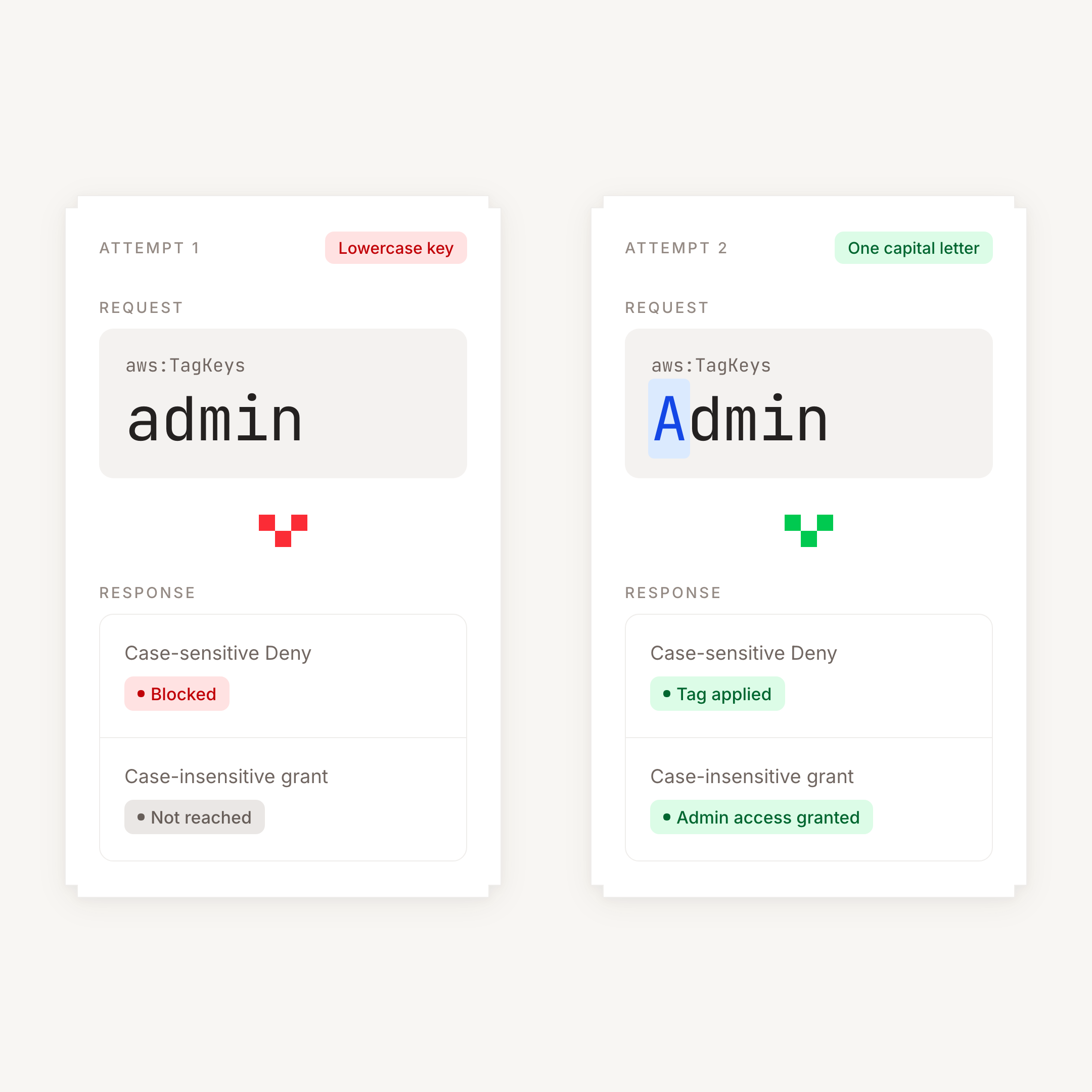
Two rules disagree about capitalization. Take a simple example: an account grants admin access to a principal with an admin tag, and a Deny rule stops you from setting that tag yourself.
The Deny rule checks the exact spelling admin. Set a tag with the key Admin instead, and it doesn't recognize the key, so it lets you apply the tag.
The access rule ignores capitalization. It recognizes Admin as the admin tag key and grants admin access.
Same key, two inconsistent rules. Capitalize a single letter and the Deny lets the tag through while the access rule treats it as genuine.
How to fix it
Match the tag key with an operator that ignores capitalization, the way the grant rule already does.
If the guard lists exact keys. One statement covers every key you name. This one guards principal tags:
{
  "Effect": "Deny",
  "Action": ["iam:TagRole", "iam:TagUser", "iam:CreateRole", "iam:CreateUser"],
  "Resource": "*",
  "Condition": {
    "ForAnyValue:StringEqualsIgnoreCase": {
      "aws:TagKeys": ["admin"]
    }
  }
}
ForAnyValue fires when any key in the request matches any key in your list, whatever the capitalization. For a tag that restricts access, also consider blocking Untag*; adding it for a tag that grants access could prevent people from removing that grant.
Session tags need their own statement. sts:TagSession is evaluated in the role trust policy or an RCP, and the block above is invalid in both: a trust policy rejects Resource, an RCP rejects iam: actions. An SCP covers sts:AssumeRole but never sees AssumeRoleWithSAML or AssumeRoleWithWebIdentity, which is where pod identity tags come from.
If the guard matches a prefix. There is no case-insensitive wildcard operator, so write out the spellings. For example, to protect tags starting with it::
"ForAnyValue:StringLike": {"aws:TagKeys": ["it:*", "iT:*", "It:*", "IT:*"]}
That stays practical while the prefix is short. For anything longer, deny every key and allowlist the ones you permit with ForAnyValue:StringNotEqualsIgnoreCase instead.
⚠️ Call to action: a policy like this might be sitting in your environment as well. Be sure to go check and update any that have it.
Act on it
Capital Offense survives because nothing in the usual toolchain reads a policy the way an attacker does. Someone copies a deny rule that looks right and pastes it into the next account, and the same bypass sprawls back across the organization.
Act reads every policy the way an attacker would, and then does something about it. Our guided campaigns orchestrate the entire flow for you, from the first flag to the enforced change.
- Flag the policy. Act reviews your SCPs, RCPs, and identity policies across all your accounts and surfaces the ones that open an attack path, including the case-sensitive tag deny described above.
- Generate the necessary policy change. Act writes the change tailored to your specific environment. There’s no blog example to copy and adapt, because it’s already written to fit what you run.
- Simulate it. The campaign simulates the change against your environment first, so you see what it touches before anything ships.
- Enforce it natively in your cloud. Once you’re happy with the simulation, the campaign enforces the change in your own environment.
Instead of copying and pasting policies and crossing your fingers that everything’s okay, use Act to manage every policy in your cloud.